Image models now take text, reference images, and JSON parameters in one call. With the Gemini 3 family of models, Google DeepMind has delivered a unified creative stack that spans every medium: Nano Banana for hyper-realistic image generation and editing, Lyria for high-fidelity music and audio composition, and Veo 3.1 for cinematic video with synchronous audio.
This collection is the definitive prompting guide for that entire stack. Sourced from Google's official documentation, the NanoPrompts.org community library, and Chase Jarvis's professional workflows, it covers every modality with Before/After prompt examples that demonstrate the difference between amateur and expert prompting.
Nano Banana models generate and edit images. They read the full prompt before rendering, delivering precise, rich visual results.
Nano Banana 2 (Gemini 3.1 Flash Image) brings real-time web search integration, fast generation, and Pro features like text rendering and upscaling to 2K/4K. Nano Banana Pro (Gemini 3 Pro Image) renders text and upscales to 2K/4K on a larger context window.
Lyria generates high-fidelity music and audio with control over genre, tempo, instrumentation, dynamics, and vocals. It supports text-to-music and image-to-music prompting.
Veo 3.1 is the latest evolution in video generation, featuring professional-grade creative controls, multiple aspect ratios, rich synchronous audio, and cinematic camera movement — all driven by structured prompting.
[!TIP]
The models are designed to work together. Generate a keyframe with Nano Banana, animate it with Veo 3.1, and score it with Lyria — all in a single production pipeline.
Nano Banana Pro excels at photorealistic rendering, character consistency, structured JSON prompting, and professional commercial output. This section covers the frameworks, techniques, and curated prompts that unlock its full potential.
The most reliable structure for Nano Banana generation follows a five-part formula. Start with a strong verb that tells the model the primary operation, then layer in specifics.
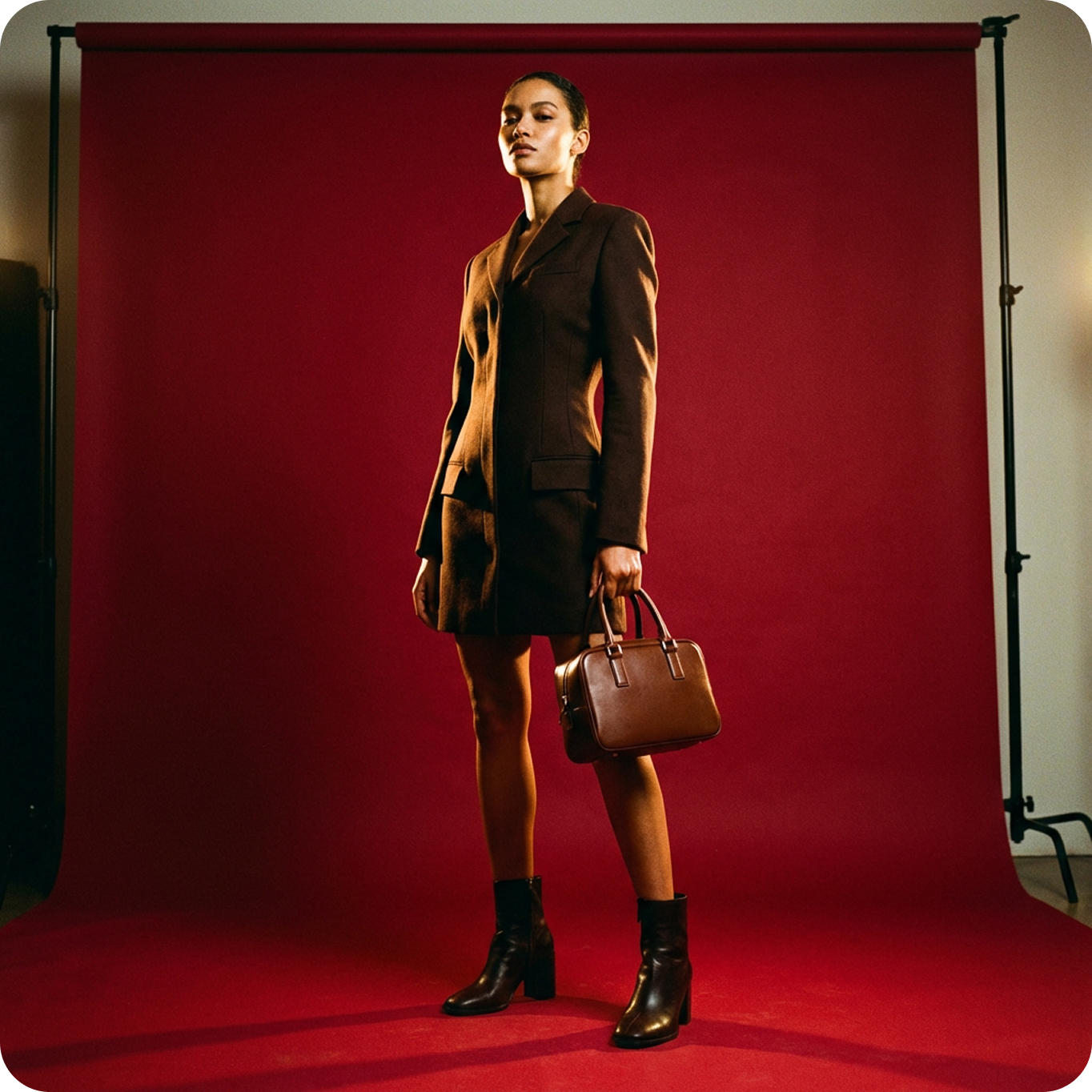
After: "A striking fashion model wearing a tailored brown dress, sleek boots, and holding a structured handbag. Posing with a confident, statuesque stance, slightly turned. On a seamless, deep cherry red studio backdrop. Medium-full shot, center-framed. Fashion magazine style editorial, shot on medium-format analog film, pronounced grain, high saturation, cinematic lighting effect."
Most people prompt like they're describing a dream — wandering sentences that lead to drift. The professional alternative is Pseudo-Code Prompting: define variables as distinct assets, then instruct the model how to combine them.
Why it works: You separate what from how. When iterating, you only change one variable — the model understands everything else must remain constant.
The Structure:
[VARIABLES]SUBJECT_A = "Professional female model, mid-30s, sharp features, wearing a structured oversized beige blazer, silk texture."LOCATION_B = "Brutalist architecture interior, concrete walls, sharp geometric shadows."LIGHTING_C = "High-contrast rim lighting, cool blue fill from the left, warm key light from the right."CAM_SETTINGS = "Phase One XF, 80mm lens, f/2.8, ISO 100, sharp focus on eyes."[EXECUTION]Render SUBJECT_A standing in LOCATION_B. Apply LIGHTING_C toemphasize the texture of the blazer. Use CAM_SETTINGS fora hyper-realistic commercial fashion look.
[!TIP]
Use the "Thinking" or "Reasoning" mode for complex physics-based lighting. Add [REASONING: Calculate true light paths based on light source position] to force physics validation.
For complex compositions where you need precise control over multiple elements, use structured JSON. Nano Banana's reasoning engine recognizes this logic and applies it consistently.
[!EXAMPLE]
Before: "A young woman taking a mirror selfie, 2000s aesthetic"
After:
{ "subject": { "description": "A young woman taking a mirror selfie with very long voluminous dark waves and soft wispy bangs", "age": "young adult", "expression": "confident and slightly playful", "hair": { "color": "dark", "style": "very long, voluminous waves with soft wispy bangs" }, "clothing": { "top": { "type": "fitted cropped t-shirt", "color": "cream white", "details": "features a large cute anime-style cat face graphic" } } }, "photography": { "camera_style": "early-2000s digital camera aesthetic", "lighting": "harsh super-flash with bright blown-out highlights", "angle": "mirror selfie", "texture": "subtle grain, retro highlights, V6 realism" }, "background": { "setting": "nostalgic early-2000s bedroom", "elements": ["chunky wooden dresser", "CD player", "hanging beaded door curtain"] }}
Nano Banana understands what you want better when you describe the positive outcome rather than the negative.
[!EXAMPLE]
Before: "A street with no people, no cars, no modern buildings"
After: "A desolate cobblestone street at dawn, bathed in warm golden light. The storefronts are shuttered. No people, no vehicles. Atmospheric fog lingers near the ground."
Before: "Remove the red car"
After: "Replace the red car with a gray van that matches the lighting and perspective of the street. The van should appear parked, stationary, blending seamlessly with the ambient shadows."
Nano Banana speaks the language of lenses and light. Use specific photographic and cinematic terminology to control depth, distortion, perspective, and mood.
"Shot on Leica SL2 with a 24mm lens. Exaggerate foreground features. Vertical distortion on architectural elements."
Portrait
"Shot on Canon R5 with an 85mm f/1.2 lens. Extremely shallow depth of field. Bokeh should be creamy and circular."
Macro
"100mm Macro lens. 1:1 magnification. Focus stacking simulation for edge-to-edge sharpness on the product texture."
Low Angle
"Low angle shot, looking up at the subject against an overcast sky. Wide-angle perspective to emphasize height and drama."
[!EXAMPLE]
Before: "Close-up portrait"
After: "Close-up portrait of a weathered sailor, shot on Fujifilm GFX 100 with a 110mm f/2 lens. The lens creates natural background compression. Skin texture must be visible — pores, fine lines, sun damage. Catchlights present in the eyes. Dramatic chiaroscuro lighting from a single window on the left."
Nano Banana's reasoning engine calculates light bounces with surprising accuracy. Define the behavior of light explicitly.
Lighting Style
Prompt Description
Rembrandt
"Classic Rembrandt lighting. Key light at 45 degrees elevation, 45 degrees horizontal. Triangle of light on the shadowed cheek. Deep shadow density ratio of 3:1."
Commercial
"High-key commercial lighting. Large softbox source overhead. White bounce cards filling shadows. Even, flattering illumination. Catchlights in both eyes."
Chiaroscuro
"Dramatic chiaroscuro. Single directional source from above-right. Harsh shadows, high contrast. Key-to-fill ratio of 8:1."
Three-Point
"Three-point lighting: key light at 45 degrees, fill at 90 degrees at 50% power, rim light behind subject at full power creating edge separation."
[!EXAMPLE]
Before: "Well-lit portrait"
After: "Three-point studio lighting. Key light: 90cm octabank, camera left, 70% power, creating soft shadows on the right cheek. Fill light: 60cm softbox, camera right, 35% power, lifting shadows to a 2:1 ratio. Rim light: narrow strip light behind subject, full power, separating hair from background. Deep charcoal gray seamless backdrop."
Specify film stock, color science, or grading styles to control the emotional texture of the output.
[!EXAMPLE]
Before: "A nostalgic photo"
After: "Kodak Portra 400 film aesthetic. Warm, nostalgic color science with slightly lifted blacks. The green channel pushed toward yellow. Skin tones with a peachy warmth. Subtle film grain, halation around highlights, soft contrast curve."
Before: "Cinematic look"
After: "Cinematic color grading with muted teal tones in shadows and warm orange in highlights. Teal shadows, orange highlights (the classic teal-orange grade). Desaturated blacks with crushed blacks in the background. Slight vignette."
The 14-reference-image limit is Nano Banana's most powerful professional feature. Use it strategically for campaign-scale consistency.
[!NOTE]
Nano Banana supports up to 14 reference images in a single prompt. Recommended slot allocation: Slots 1-3 for character turnarounds, Slots 4-5 for brand assets (logo, color palette), Slots 6-10 for style and mood references.
[SLOT 1-3] Character Turnaround: front view, 3/4 view, side view[SLOT 4] Brand Logo: transparent PNG, primary color palette[SLOT 5] Color Swatches: exact hex values for campaign colors[SLOT 6-8] Lighting References: mood board images defining the light quality[SLOT 9-10] Style References: photography style, texture direction[SLOT 11-14] Environment/Prop References: setting details, key propsPrompt:"Using the character defined in Slots 1-3, place them into thelocation described in Slot 11. Apply the lighting quality fromSlot 6. Ensure the brand logo from Slot 4 is visible on theclothing. Maintain facial structure from Slot 1 exactly. Usethe color grading from Slot 9."
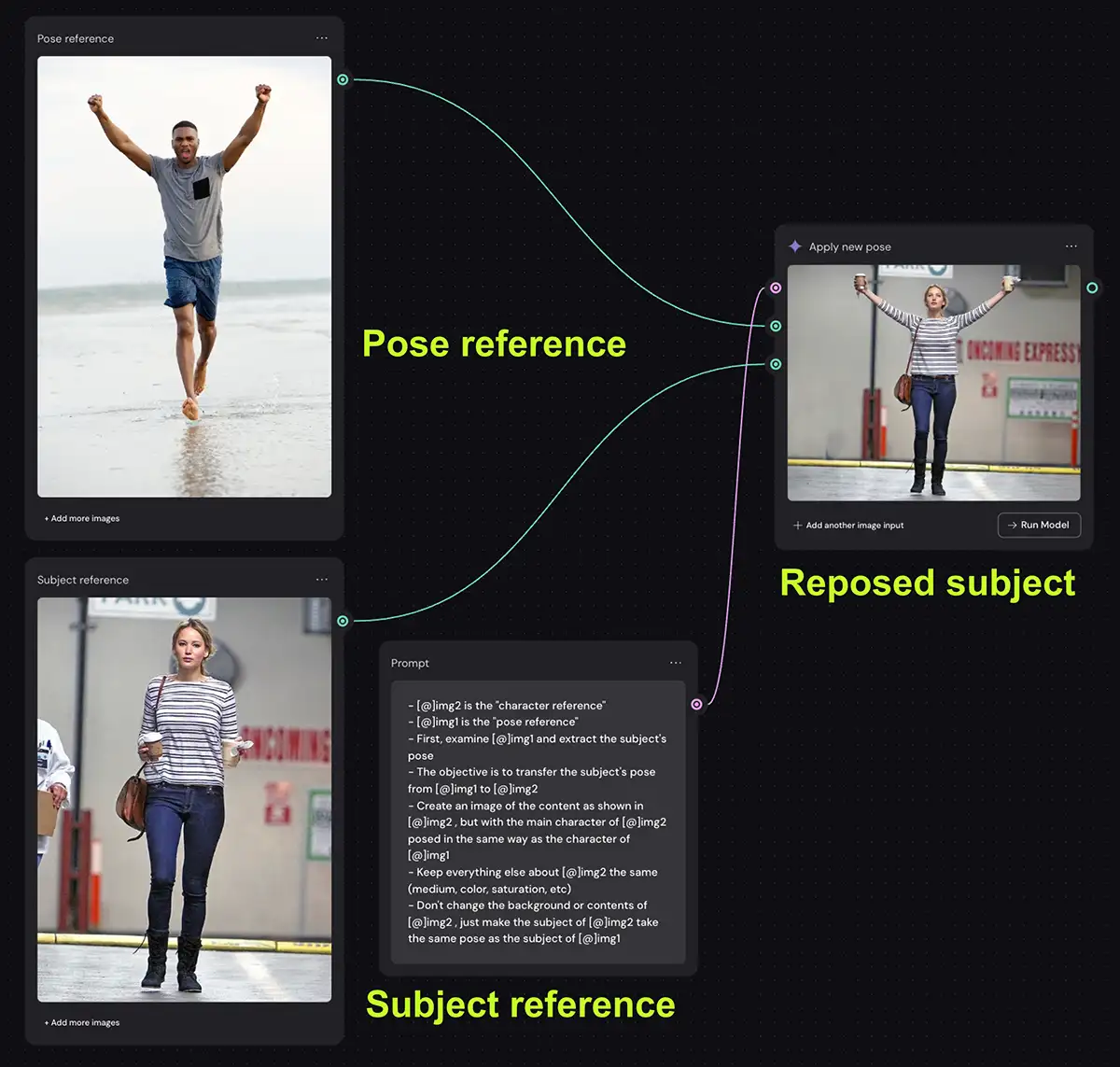
Using the Weavy node interface, you can decouple a subject's identity from their pose — transferring the geometry from one image to another.
[!TIP]
Run the generation 3-4 times. If anatomy breaks (fingers, knees), swap the pose reference for a clearer image.
Inputs:
Top Node (Pose): A reference image with the desired geometry — stock photo, sketch, or 3D block-out
Bottom Node (Subject): Your target subject with the appearance you need to preserve
The Pose-Transfer Prompt:
[@img1 is the pose reference][@img2 is the character reference]First, examine img1 and extract the subject's pose, includingthe position of all limbs, torso angle, and head orientation.The objective is to transfer the subject's pose from img1 to img2.Create an image of the content as shown in img2, but with themain character of img2 posed in the same way as the characterof img1.Keep everything else about img2 the same — medium, color,saturation, lighting quality, background.Don't change the background or contents of img2. Only transferthe pose from img1's subject to img2's subject.
Output: The subject from img2 rendered in the exact pose from img1.
[!NOTE]
This technique works with sketches and 3D block-outs as the pose reference — not just photographs. Concept artists use this to turn napkin sketches into photorealistic assets.
Apply the complete aesthetic of one image to the subject of another — without blending the content.
[!NOTE]
The model doesn't just slap a filter on. It re-renders the subject from the ground up using the physics of the style reference.
Inputs:
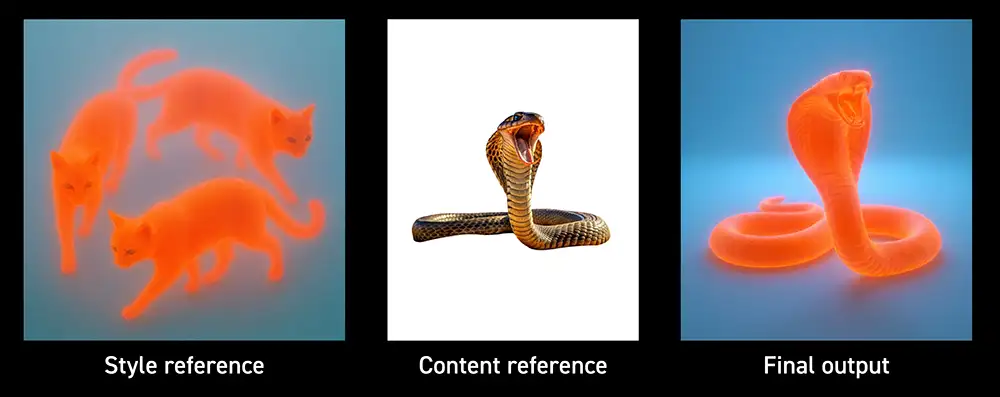
Style Reference (img1): The "vibe" — defines lighting, texture, color palette, rendering technique
Content Reference (img2): The "subject" — the person, product, or scene you need
The Style-Clone Prompt:
Create an image of the content as shown in [@img2] but with thesame medium, color palette, mood, rendering technique, saturationlevel, textures, and overall style of [@img1].Extract ONLY the aesthetic qualities from img1 — do not includeany objects, subjects, or compositions from img1.Apply the extracted style to img2's subject while preservingimg2's subject identity and composition.
Output: The subject from img2 rendered with the lighting, texture, and color science of img1.
[!EXAMPLE]
Style Reference: A glowing, subsurface-scattering orange illustration of cats on a blue background.
Content Reference: A standard photograph of a king cobra.
Result: The cobra re-rendered with the translucent orange glow and lighting physics of the cat illustration — without becoming a cat.
Nano Banana is the first AI image model with reliable typography — rendering sharp, legible text on posters, packaging, and product mockups. It supports multilingual text in 10+ languages.
[!TIP]
Text-first hack: When generating text-heavy images, first converse with the model to generate the text concepts, then request the final image with that text embedded. This ensures the model gets the text right before worrying about composition.
Rules for text rendering:
Rule
Example
Use quotes around text
"CREATIVE FUTURE" in bold white sans-serif (Helvetica style)
Describe the font explicitly
"Century Gothic 12px font" or "flowing Brush Script"
Specify placement
"Title text at top, subtitle below, 2/3 text area"
Define layering
"Text acts as a cut-out window over the subject"
[!EXAMPLE]
Before: "A poster that says Creative Future"
After: "A typographic poster with a solid black background. The words 'CREATIVE FUTURE' in bold white Helvetica Neue font, filling the center of the frame. The text acts as a cut-out window. A photograph of a misty mountain landscape is visible ONLY inside the letterforms, with soft bokeh in the background."
Nano Banana 2 is powered by real-time information from web search. Instead of describing a fictional scene, instruct the model to retrieve current data and visualize it.
The Formula:[Search/Source Request] + [Analytical Task] + [Visual Translation]
[!EXAMPLE]
Before: "The weather in San Francisco today"
After:
Search for current weather conditions, date, and time in San Francisco.Analytically, use this data to modify the scene: if it's raining,render the city with overcast skies and wet reflective streets.If it's sunny, render warm golden light washing over the buildings.Visualize this as a miniature city-in-a-cup concept embedded withina realistic, modern smartphone UI. The miniature city should reflectthe actual current weather of San Francisco.
The following prompts represent battle-tested techniques from the NanoPrompts.org community, Google Cloud documentation, and Chase Jarvis's professional workflows.
Create a hyper-realistic, ultraSharp, full-color large-formatimage featuring a massive group of celebrities from different eras,all standing together in a single wide cinematic frame. The imagemust look like a perfectly photographed editorial cover with impeccablelighting, lifelike skin texture, micro-details of hair, pores,reflections, and fabric fibers.GENERAL STYLE & MOOD: Photorealistic, 8k, shallow depth of field,soft natural fill light + strong golden rim light. High dynamic range,calibrated color grading. Skin tones perfectly accurate. Crisp fabricdetail with individual threads visible. Balanced composition,slightly wide-angle lens (35mm), center-weighted.THE ENVIRONMENT: A luxurious open-air rooftop terrace at sunsetoverlooking a modern city skyline. Warm golden light wrapping aroundsilhouettes. Polished marble surfaces reflecting ambient light.
Simulate complex studio setups before renting gear — a pre-visualization tool that saves studio time.
[!EXAMPLE]
[SETUP]Subject in center, looking at camera.Light 1: 10ft octabank, camera left, 50% power, creating soft wrap-around shadows.Light 2: Snooted kicker, camera right rear, 100% power, teal gel creating colored edge light on hair and shoulder.Light 3: Ring light fill, on-axis, 25% power, lifting shadow density under the nose.Background: seamless gray paper, lit evenly.Render this as a photorealistic simulation of the above lightingdiagram. The subject is a professional male model, mid-40s, wearinga navy wool suit.
A commercial grade photograph of [uploaded reference image] posinginside a high-end museum exhibition space.Behind them hangs a large, ornate framed classical oil painting.The painting depicts the same person but rendered in a rich,traditional oil painting style with thick, visible impastobrushstrokes, deep textures, and rich color palettes on canvas.Gallery spotlights hit the textured paint surface.Masterpiece, ultra-detailed, cinematic lighting, strong contrast,dramatic shadows, 8K UHD, highly detailed textures,professional photography.
Product: [BRAND] [PRODUCT NAME] - [bottle shape], [label description], [liquid color]Scene: Luxury product shot floating on dark water with [flower type] in [colors] arranged around it. [Lighting style] creates reflections and ripples across the water.Mood & Style: [Adjectives], high-end commercial photography, [camera angle], shallow depth of field with soft bokeh background
Generate specific locations at specific times using latitude/longitude coordinates.
[!EXAMPLE]
Before: "A famous location"
After: "Create an image at 35.6586 degrees N, 139.7454 degrees E (Tokyo) at 19:00. Golden hour has just passed. The Tokyo Tower is illuminated in orange against a deep blue twilight sky. Cherry blossoms are in full bloom along the walkway. Steam rises from street food vendors. Cinematic composition, wide-angle establishing shot."
Source: Google Cloud Blog (coordinates from Replicate)
Lyria generates high-fidelity music and audio from text prompts and images. Built for creators who need finished tracks — not loops — Lyria gives you control over every dimension of a musical arrangement.
Lyria prompting follows a layered structure. Each layer builds on the last: Genre establishes the foundation, Tempo sets the pace, Instruments fill the arrangement, Dynamics shape the flow, and Vocals carry the melody.
[!NOTE]
Lyria supports image-to-music: upload any image and describe its mood to generate a matching soundtrack. Think about the subject, location, lighting, and atmosphere — Lyria interprets these visual cues musically.
Define the primary genre and optionally blend eras or styles.
[!EXAMPLE]
Before: "A rock song"
After: "1980s arena rock anthem. Heavy kick drum with double-pedal speed. Thick, gated-reverb snare cracking on beats 2 and 4. Distorted power chords in drop-D tuning. Emotive male tenor lead vocal with long sustained notes. Analog synthesizer pads in the background. Stadium reverb on the entire mix."
Source: DeepMind Lyria Prompt Guide
Genre Blending Examples:
Prompt
Result
"K-pop with a Motown edge"
Contemporary K-pop production values with classic soul vocal phrasing and brass hits
"Classical violins merged into a funk track"
Funk rhythm section with orchestral string arrangements overlaid
"Early 90s hip-hop with 808s and jazz samples"
Boom-bap drums, warm vinyl texture, jazz piano loops
Add specific instruments to shape the sonic character. If you don't specify, Lyria auto-selects instruments to suit the genre.
[!EXAMPLE]
Before: "A jazz song"
After: "Quintessential 1970s Motown soul. Lush, orchestral R&B production. Warm bassline with melodic fills, locked into a steady drum groove with crisp snare and tambourine. Vintage organ harmonic bed. Three-piece brass section. Gritty, gospel-tinged male tenor lead vocal."
Source: DeepMind Lyria Prompt Guide
Instrument Control
Example
Add unexpected instruments
"1990s R&B with 80s synth" — adds analog synth textures to contemporary production
Specify instrument behavior
"Clean funk-style guitar rhythm, staccato chord stabs on the upbeat, warm wah-wah pedal swells, no distortion"
Define how music flows between sections — builds, drops, instrumental breaks, and dynamic swells.
[!EXAMPLE]
Before: "A song with a loud part"
After: "Wistful and airy. Soft, breathy female vocals with intimacy. The track builds slowly from a quiet piano intro into an explosive chorus at 1:30, with full drum kit, swelling strings, and layered backing vocals. After the chorus, it returns to the quiet piano arrangement with only vocals and soft synth pads."
Before: "A song with background music"
After: "Nocturnal aesthetic with cinematic forward motion. The track opens with ambient synth pads for 8 bars, then introduces a driving 16th-note analog synthesizer bass arpeggio. Percussion anchored by a powerful snare with 1980s gated reverb. Swelling cinematic pads build throughout. Male vocalist with soaring vocal lines enters at bar 16."
"Fast-paced rap verses, laid-back melodic chorus, call-and-response between lead and backing vocals"
[!EXAMPLE]
Before: "A song with a singer"
After: "A breathy soprano with intimate, hushed delivery. The voice sits low in the mix, almost whispering. Occasional falsetto runs. No vibrato, no ornamentation — pure, raw emotion. Like a late-night confessional."
Write specific lyrics using the Lyrics: prefix. Add backing vocal echoes in parentheses.
[!EXAMPLE]
Lyrics: The city lights are bleeding through the rain,We're dancing in the memories left behind.Running at the speed of a whispered name,Caught in a rhythm only we can find.(Letra: Las luces de la ciudad sangran a través de la lluvia,Bailamos en los recuerdos que dejamos atrás.)
Upload any image to generate music that matches its mood. Think about three dimensions:
Image Dimension
What to Describe
Musical Translation
Subject
Who or what is the focus?
Genre, vocal gender, energy level
Location
Indoor/outdoor, city/nature, setting
Instrumentation, ambient sounds, tempo
Atmosphere
Happy, sad, tense, calm
Key, dynamics, tempo, chord progression
[!EXAMPLE]
Image: A proud-looking ginger cat sitting on a blanket draped over a cozy armchair. Soft light streams through a window, illuminating a coffee table with a cup and several stacked books. The cat's eyes are semi-closed — relaxed and sleepy.
Prompt: "A lazy Sunday afternoon. Relaxed acoustic guitar strumming a fingerpicked pattern. Soft jazz piano chords in the background. The sound of a gentle rain on glass. Warm, nostalgic, peaceful. No vocals — pure instrumental atmosphere."
This is a massive, anthemic Alternative Rock chorus in the styleof Post-Grunge and Arena Rock. The foundation is a thunderous,powerful drum kit: a heavy kick drum hits while a thick,gated-reverb snare cracks on beats 2 and 4. A driving, melodicbass line propels the harmony forward, acting as a crucial melodicanchor.Layered electric guitars play palm-muted power chords withaggressive distortion. A lead guitar soars with a sustainedpentatonic solo over the final 8 bars. The mix is thick and dense,with reverbs reaching 2-3 seconds on the drums.Floating powerfully over this dense instrumental wall is an emotivemale tenor lead vocal, belting at full chest voice. Backing vocalsharmonize in thirds. The chorus ends with a dramatic drum fill.Tempo: 128 BPM. Key: E minor.
An intimate, sophisticated Brazilian Bossa Nova track evoking thequiet atmosphere of a Rio beach at sunset. The tempo is a gentle78 BPM. A nylon-string acoustic guitar plays the characteristicsyncopated bossa nova rhythm — staccato chords on beats 2 and 4.A upright bass walks a relaxed melodic line.Gentle female vocals in Portuguese, breathy and intimate,with natural room ambience. The melody floats above thearrangement with subtle reverb. Soft shakers and a nylon guitarprovide the rhythmic pulse. Gentle wave sounds blend into themix as ambient texture.The arrangement is sparse — only guitar, bass, vocals, and subtlepercussion. Warm, romantic, nostalgic.
Driving electronic dance music at 128 BPM. Four-on-the-floorkick drum with crisp transient attack. Layered hi-hats — closedon the 8th notes, open on the off-beats. Sidechained synthpads pumping in sync with the kick.A catchy melodic hook played on a warm analog supersawsynthesizer. Filter sweeps automate on every 8 bars. The bassis a thick sawtooth wave with moderate compression.Breakdown at 1:30: all elements drop except a filteredarpeggiated synth and single kick. Build-up reintroduceselements one by one. Full release at 2:00 with all elementsat maximum volume. No vocals — pure instrumental energy.
A lo-fi hip-hop instrumental for studying. 85 BPM. Vinyl-warmedsampled drums with a heavily compressed kick and snare. The hi-hatpattern is swung slightly. A looped jazz piano sample plays aminor-key chord progression with natural reverb decay. A warmvinyl crackle sits at -24 dB in the background.A double bass plays a walking line that steps through the chordchanges. The entire sample is processed through a low-pass filterthat opens slightly during the chorus section. The mix is warmand slightly muddy — intentionally lo-fi. No vocals.Total runtime: 3 minutes, seamless loop.
A Celtic folk ballad. Solo acoustic guitar in DADGAD tuning,fingerpicked in a traditional Celtic style. The melody isplayed on a tin whistle with natural vibrato. Occasionalviolin (fiddle) enters during the chorus, playing a mournfulmelody in A minor.A bodhran drum provides a steady pulse. Male vocalist singsin a traditional Irish folk style — slight nasality, strongprojection, no vibrato. The lyrics tell a story of a sailorlost at sea.The arrangement grows organically: guitar solo intro,whistle joins at verse 2, full ensemble by the final chorus.Gentle room reverb. Recorded to sound like a live pub session.
Veo 3.1 is Google's state-of-the-art video generation model. It brings professional-grade creative controls, multiple aspect ratios, rich synchronous audio, and cinematic camera movement to a prompting-driven workflow.
[!EXAMPLE]
Before: "A person working in an office"
After: "Medium shot, a tired corporate worker rubbing his temples in exhaustion, in front of a bulky 1980s computer in a cluttered office late at night. The scene is lit by harsh fluorescent overhead lights and the green glow of the monochrome monitor. Retro aesthetic, shot as if on 1980s color film, slightly grainy. Ambient: the hum of old CRT monitors and the click of a mechanical keyboard."
"Slow dolly in toward the character's face, revealing their expression"
Tracking shot
Camera follows subject horizontally
"Tracking shot following the explorer as she steps into the clearing"
Crane shot
Camera moves up/down on a crane
"Crane shot starting low, ascending high, revealing the vast canyon"
Aerial view
Drone-style overhead shot
"Aerial view from 200 meters, slowly orbiting the castle"
Slow pan
Horizontal rotation
"Slow pan left to reveal the city skyline emerging from fog"
POV shot
First-person perspective
"POV shot from behind the singer, looking out at a cheering crowd"
Dutch angle
Tilted frame for tension
"Dutch angle, tilted 15 degrees, to convey disorientation"
[!EXAMPLE]
Before: "Video of a canyon"
After: "Crane shot starting low on a lone hiker and ascending high above, revealing they are standing on the edge of a colossal, mist-filled canyon at sunrise, epic fantasy style, awe-inspiring, soft morning light."
"Deep focus, every element sharp from foreground to background"
[!EXAMPLE]
Before: "A woman on a bus"
After: "Close-up with very shallow depth of field, a young woman's face, looking out a bus window at the passing city lights with her reflection faintly visible on the glass, inside a bus at night during a rainstorm, melancholic mood with cool blue tones, moody, cinematic."
Veo 3.1 generates complete, synchronized soundtracks based on text instructions.
Audio Type
Syntax
Example
Dialogue
Quotation marks for speech
'A woman says, "We have to leave now."'
Sound Effects (SFX)
Describe sounds precisely
"SFX: thunder cracks in the distance, followed by heavy rain"
Ambient Noise
Define the soundscape
"Ambient: the quiet hum of a starship bridge, distant console beeps"
Music
Describe the score
"Swell to a cinematic orchestral score with rising strings"
[!EXAMPLE]
Before: "Add some sound effects"
After:
[00:00-00:02] Medium shot of a woman entering a dark forest.SFX: crunching dry leaves underfoot, wind rustling through branches.Ambient: distant owl calls, the sound of the forest settling for night.[00:02-00:04] Close-up of the woman's face, eyes widening in fear.SFX: a sudden snap of a twig nearby. Heartbeat sound effect begins.[00:04-00:06] Wide shot revealing what she sees: ancient stone ruins.Music: a single cello note, low and foreboding, sustained for 3 seconds.
Refine your video output by describing exclusions with precision.
[!EXAMPLE]
Before: "No bad things in the video"
After:
"A desolate landscape with no buildings, no roads, no vehicles, no modern infrastructure — only wilderness"
"A crowd scene with no blurred faces, no duplicate characters, no distorted hands"
"An underwater scene with no visible camera equipment, no bubbles from artificial sources, no anachronistic objects"
[!NOTE]
For video, negative prompting is especially useful for: motion artifacts ("no jittering, no motion blur on static objects"), continuity errors ("the time of day remains consistent throughout"), and visual noise ("no flicker, no frame drops").
Create controlled camera movements or transformations between two distinct images using the First/Last Frame feature.
Step 1 — Generate the starting frame with Nano Banana:
Medium shot of a female pop star singing passionately into a vintagemicrophone. She is on a dark stage, lit by a single, dramaticspotlight from the front. She has her eyes closed, capturing anemotional moment. Photorealistic, cinematic, shot on medium-formatcamera, 85mm lens, shallow depth of field.
Step 2 — Generate the ending frame with Nano Banana:
POV shot from behind the singer on stage, looking out at a large,cheering crowd. The stage lights are bright, creating lens flare.You can see the back of the singer's head and shoulders in theforeground. The audience is a sea of lights and silhouettes.Energetic atmosphere. Photorealistic, cinematic.
Step 3 — Animate with Veo 3.1:
The camera performs a smooth 180-degree arc shot, starting withthe front-facing view of the singer and circling around her toend on the POV shot from behind her on stage. Thesinger sings "when you look me in the eyes, I can see a millionstars." SFX: crowd cheering, stage lights humming. Music: swellingarena rock anthem.
[!TIP]
The transition prompt should describe the camera movement and what happens between the two frames, not just repeat the images.
Generate multi-shot scenes with consistent characters using the Ingredients to Video feature with up to 4 reference images.
Step 1 — Generate your ingredients with Nano Banana:
Create reference images for each character and the setting (up to 4 total).
Step 2 — Compose the scene:
Using the provided images for the detective, the woman, and theoffice setting, create a medium shot of the detective behind hisdesk. He looks up at the woman and says in a weary voice,"Of all the offices in this town, you had to walk into mine."SFX: the creak of an old office chair, rain on glass outside.Ambient: the muffled sound of city traffic, distant thunder.
Using the provided images for the detective, the woman, and theoffice setting, create a shot focusing on the woman. A slight,mysterious smile plays on her lips as she replies, "You werehighly recommended." Camera slowly dollies toward her face.Lighting: a desk lamp creates a pool of warm light, the restof the office fades into shadow.
[!NOTE]
The Ingredients to Video feature now supports audio generation alongside the consistent character visuals. Each shot can have its own dialogue, SFX, and ambient audio.
Direct a complete multi-shot sequence with precise cinematic pacing — all within a single generation.
[!EXAMPLE]
Before: Single paragraph prompt
After:
[00:00-00:02] Medium shot from behind a young female explorerwith a leather satchel and messy brown hair in a ponytail, as shepushes aside a large jungle vine to reveal a hidden path.Camera: slow dolly forward.[00:02-00:04] Reverse shot of the explorer's freckled face,her expression filled with awe as she gazes upon ancient,moss-covered ruins in the background.SFX: The rustle of dense leaves, distant exotic bird calls.[00:04-00:06] Tracking shot following the explorer as shesteps into the clearing and runs her hand over the intricatecarvings on a crumbling stone wall. Emotion: Wonder and reverence.[00:06-00:08] Wide, high-angle crane shot, revealing thelone explorer standing small in the center of the vast,forgotten temple complex, half-swallowed by the jungle.SFX: A swelling, gentle orchestral score begins to play.Ambient: the sound of wind through ancient stone corridors.
Slow dolly shot, wide angle, inside a candlelit Italian restaurantat night. A couple sits at a corner table, engaged in quietconversation. Waiters move gracefully between tables carryingplates of pasta. Warm amber light from candles and Edison bulbscreates intimate pools of light. The background dining roomsoftens into bokeh.Camera slowly tracks toward the couple as one of them reachesacross the table. Dialogue: "You know, I've never told anyonethis before..."SFX: the gentle clink of wine glasses, soft jazz from a cornerquartet, the murmur of other diners.Style: romantic cinema, warm color grade, lens flare from candlelight, shallow depth of field, 24fps cinematic motion.
Source: Google Cloud Blog (inspired by Veo 3.1 recipe)
POV shot running through rain-slicked neon-lit cyberpunk alleyways.The camera bobs and weaves with the runner's pace — handheldaesthetic, wide-angle lens, fast motion blur on rain drops.Holographic advertisements flicker in multiple languages.Steam rises from vents in the pavement.Cut to: Low angle tracking shot, following the runner's bootsslapping through puddles of neon reflections — pink, cyan, amber.SFX: footsteps echoing, distant sirens, rain hitting metal.Ambient: an AI-generated city soundscape, distant chatter inJapanese and English, hovering vehicle hums overhead.Style: Blade Runner 2049 meets Akira. High contrast, teal shadows,orange/amber highlights. Slight film grain. Cinematic letterboxing.
Source: Google Cloud Blog (inspired by Veo 3.1 recipe)
Wide establishing shot of a coral reef at midday. Sunlightshafts pierce the water surface from above, creating god rays.Schools of colorful fish move in synchronized patterns.A sea turtle glides slowly through the frame.Camera slowly pushes in toward a coral formation, revealingintricate detail. Macro lens simulation, deep focus.The scene transitions to: Close-up of a tiny clownfish hidingamong an anemone's tentacles.SFX: Bubbles rising steadily, the muffled sounds of the oceansurface above, whale song in the distant background.Ambient: A gentle, orchestral underwater documentary score —soft strings, woodwinds, sustained cello notes.Style: BBC nature documentary, vibrant color saturation,natural lighting, smooth camera movements, 30fps.
Source: Google Cloud Blog (inspired by Veo 3.1 recipe)
Shot 1 [00:00-00:02]: Wide shot of a packed outdoor festivalat dusk. Thousands of people raise their phones recording themain stage. Pyrotechnics erupt behind the headline act.Camera: static wide, crowd fills the frame.Shot 2 [00:02-00:05]: Medium shot of the lead singer atcenter stage, microphone in hand, belting into the crowd.Stage lights in every color of the spectrum. Camera: slowdolly toward the singer. Dialogue: the singer shouts,"San Francisco, make some noise!"Shot 3 [00:05-00:08]: Extreme close-up on the singer's face,sweat on the skin, eyes closed, pure emotion. Lens flaresfrom stage lights. Music: the band launches into the finalchorus — thunderous drums, distorted guitars, crowd roaring.
Source: Google Cloud Blog (inspired by Veo 3.1 recipe)
Medium shot of a cozy independent coffee shop on a rainyafternoon. A young woman sits at a window table, typing ona laptop, a latte and open book beside her. Rain streaksdown the window. String lights hang above the counter.Camera: static medium shot, shallow depth of field on thewoman, the background café activity soft but present.SFX: the hiss of the espresso machine, gentle rain on glass,soft indie folk music playing from overhead speakers.Style: Wes Anderson meets lo-fi aesthetic. Warm amber andteal color palette. Slightly desaturated. 24fps with gentlemotion. The entire scene feels like a warm hug.
Source: Google Cloud Blog (inspired by Veo 3.1 recipe)
Upload any Nano Banana-generated image to Lyria and describe its mood for a matching soundtrack.
[!EXAMPLE]
Nano Banana generates: A misty mountain landscape at dawn, a lone hiker silhouetted against an orange sky.
Lyria prompt: "A cinematic ambient soundtrack for a mountain landscape. Solo acoustic guitar playing a contemplative fingerpicked pattern. The sound of wind through pine trees. A single bird call in the distance. No vocals. Expansive, peaceful, meditative. 70 BPM."
For complete productions, use all three models in sequence:
Nano Banana generates concept art and keyframes
Veo 3.1 animates the keyframes with synchronous audio
Lyria generates a custom score that layers with or replaces the Veo 3.1 audio
[!TIP]
Use Lyria's stem controls to layer music under Veo 3.1's dialogue and SFX. Prompt Lyria with: "Background instrumental only, designed to sit beneath dialogue and sound effects. Tempo: 95 BPM, unobtrusive acoustic arrangement."
This collection is curated from Google Cloud Blog, Google DeepMind documentation, NanoPrompts.org, Chase Jarvis's professional workflow guides, and community contributions on X (Twitter), WeChat, and other platforms. All prompts retain their original sources for attribution.